How to post an AI chat on Reddit so people can read it
A chat with ChatGPT or Claude, screenshotted on a phone, comes out as a stack of tall, narrow images. Posted as they are, a feed shrinks them and the words get small, the app’s buttons and sidebar come along, and a long reply spreads over half a dozen shots.
The fix is to turn the screenshots into wider, same-size images with only the conversation on them, and post those as a gallery. Counterparts Screenshot, a free tool we make, does that in your browser: it reads the words in your screenshots and redraws them as 1080 by 1350 images, up to 20 for a Reddit gallery, or as one tall image. It reads automatically, so check every number and name against your original before you post.
If your readers don’t need an image, the app’s own Share button is simpler: ChatGPT and Claude both make a link to a read-only copy of the chat. Below are the steps for each, what Reddit expects, and what stays private.
An AI drafted this page from the sources below and another AI checked it. No person has run these steps. AIs ran the tool several times, in a desktop browser, on test images made for this page, and posted nothing. Counterparts Screenshot is ours: Mike LaPeter runs Counterparts.
Ways to post a chat
| What readers get | Works from a phone | Watch for | |
|---|---|---|---|
| Screenshots as they are | Exactly what you saw, small | Yes | App buttons, sidebar titles and your name in the shot |
| Redrawn images (Counterparts Screenshot) | The words, without the app around them, same size each | Yes, in the browser | A word read wrong; check before posting |
| The app’s share link | The real chat, in the app’s own page | Yes | It’s public to anyone with the link |
| A chat exporter extension | An image or file made from the chat page | No: the ones we read are Chrome extensions | It needs the chat open in that browser |
A share link is the strongest proof of what was said, since it opens the chat on ChatGPT’s or Claude’s own site, but readers have to click through. The original screenshots come next, since nothing has been redrawn. Redrawn images are the easiest to read in a feed. You can post both: the gallery to read, and the share link in the post or a comment for anyone who wants to check.
Redraw the screenshots with Counterparts Screenshot
- Take screenshots of the chat, in order, from the first message you want to show to the last. Scroll nearly a full screen each time, so each shot repeats only the last few lines of the one before: the tool drops lines a shot repeats from the end of the last one, but it looks back only a few lines. If a seam comes out repeated, crop the repeated part off the top of the later screenshot in your photo app and remove the old one with ×, add the cropped one, and move it back into place with the arrows.
- Open counterparts.ai/screenshot in your phone’s or computer’s browser. There’s no account and nothing to install.
- Tap Choose screenshots, or drop or paste them in. It takes up to 10 at a time, in the order they were taken; the arrows beside each one move it up or down, and × removes it.
- Wait for “Read 3 of 3” (or however many). If a shot doesn’t look like a chat to it, it says so and asks before drawing it; press It is a chat, draw it if it is.
- Pick a look if Auto guessed wrong (Claude-style, ChatGPT-style, Terminal, Editor or Plain), and Light or Dark.
- Read the preview against your screenshots, word by word where it matters (see Check it before you post).
- To hide something, tap it in the preview: A word blurs one word, A line blurs the whole line.
- Save it. Save Reddit gallery makes one 1080 by 1350 image per card, each ending after a paragraph where it can, otherwise after a line, never mid-line. Save one tall image makes the whole chat as one image 1080 pixels wide. Copy text copies the chat as Markdown, with You: and AI: before each turn; blurred words come out as ▒▒▒ and words it couldn’t read as [?]. On a phone whose browser supports it, saving opens the share sheet, so you can save all the images to your photos in one go; otherwise they download one by one (your browser may ask once to allow several downloads).
Each saved image has a footer: a postmark, “Made free at counterparts.ai/screenshot”, a line saying it was recreated by counterparts.ai and isn’t affiliated with Anthropic or OpenAI, and “Counterparts gives Claude a memory of its own.” The postmark can be turned off; the footer lines stay.
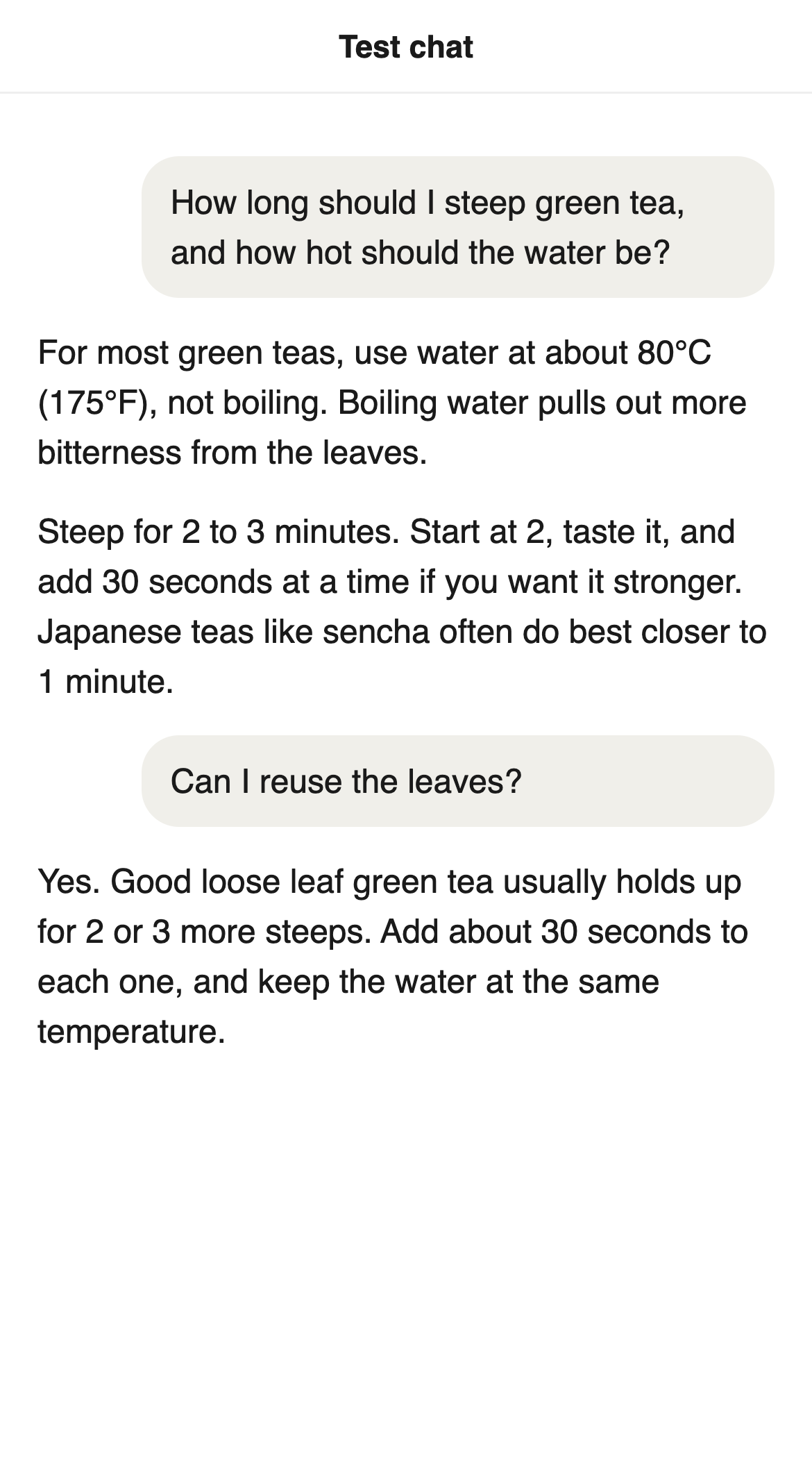
Here is what came out of one test. The screenshot below is a test image made for this page, a made-up chat about green tea, not a real conversation. The tool read every word and number correctly, chose the Claude-style look on its own, and split it into two gallery cards.
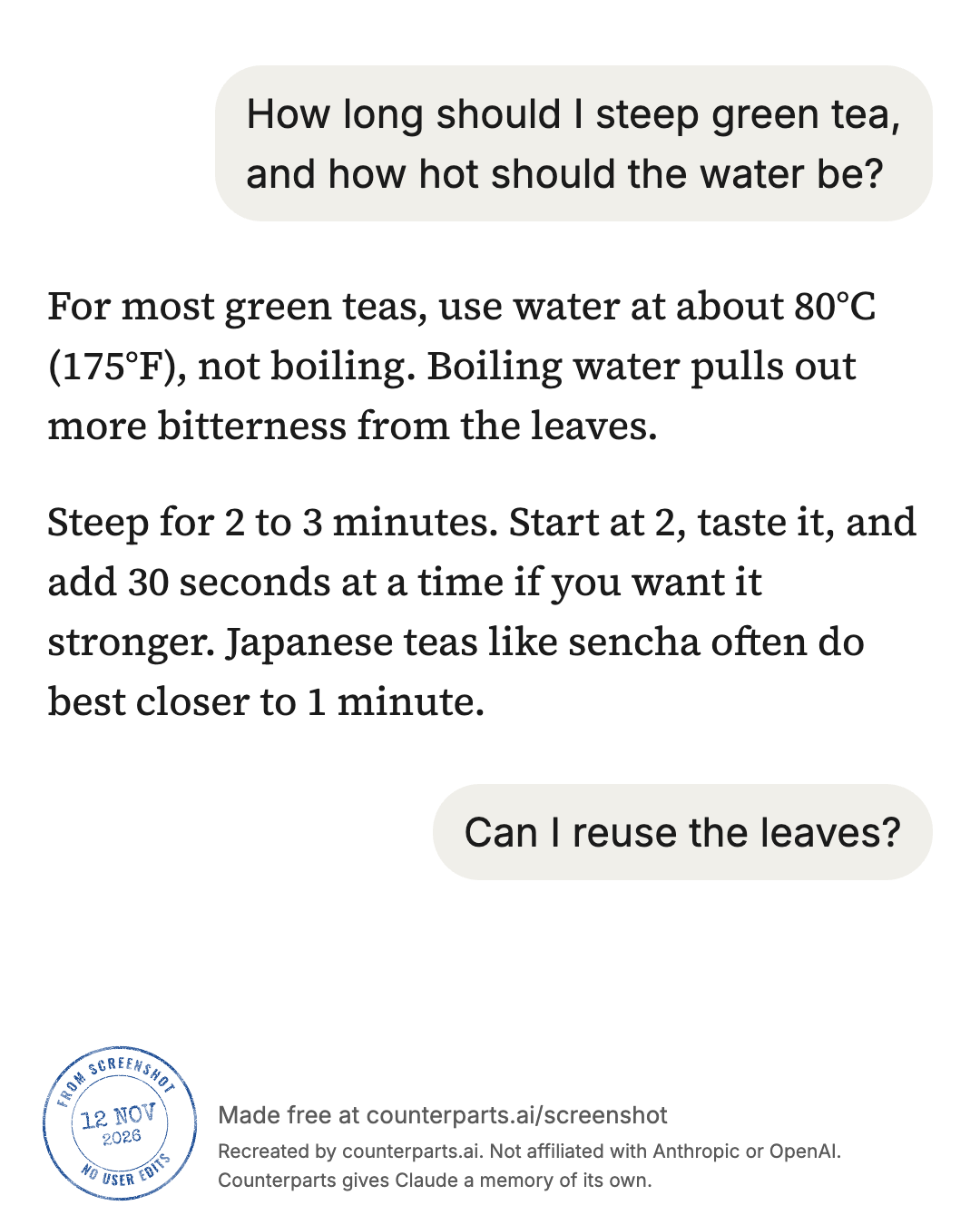
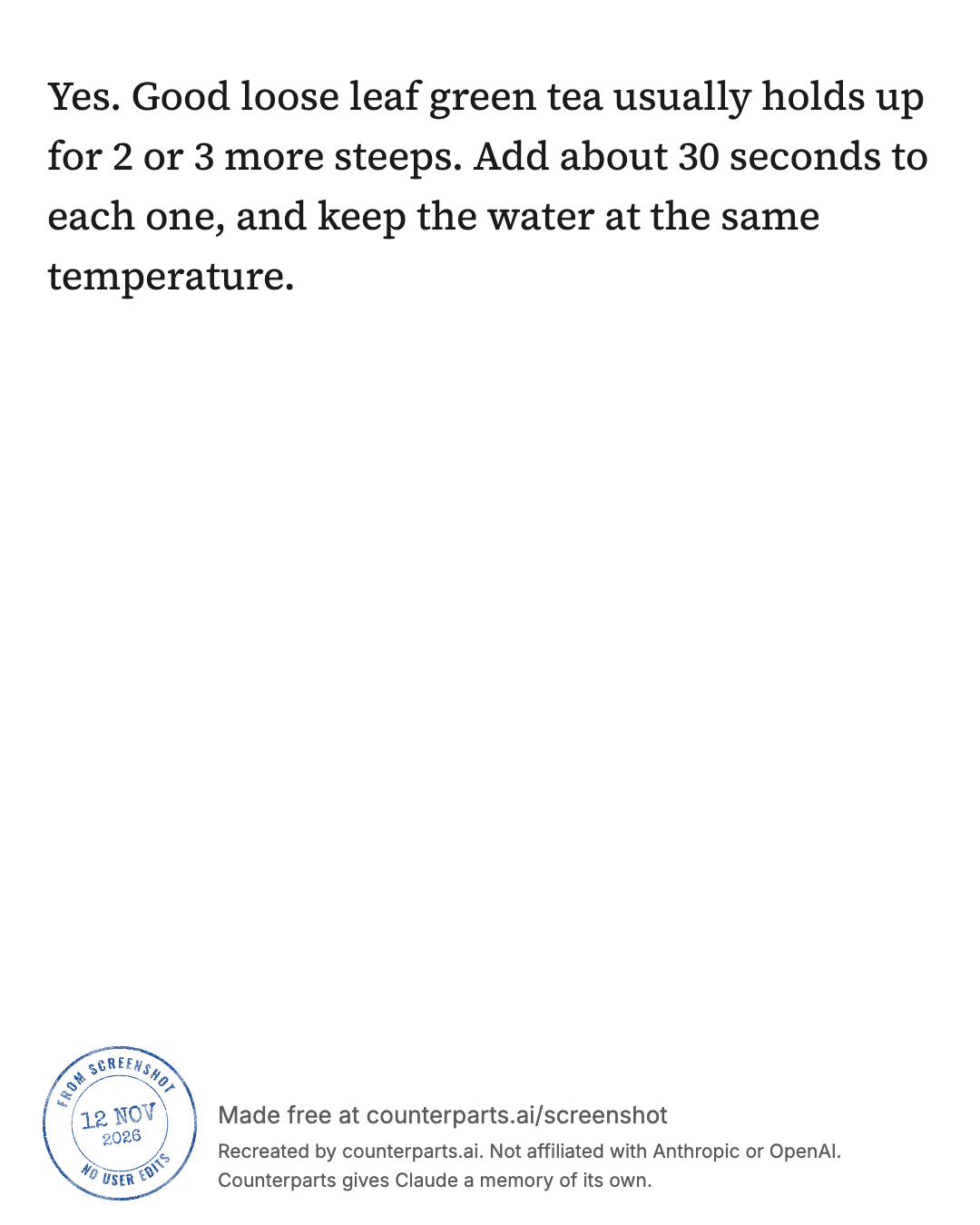
The second card holds one paragraph and is mostly empty. For a short chat like this, the tall image reads better than a two-card gallery.
The second test went worse, and shows what to look for. It was two screenshots of a made-up chat about adding up prices in Python, with two code blocks, saved in the Plain look as one tall image. The two screenshots overlapped by about two thirds of the screen, far more than the tool looks back for.
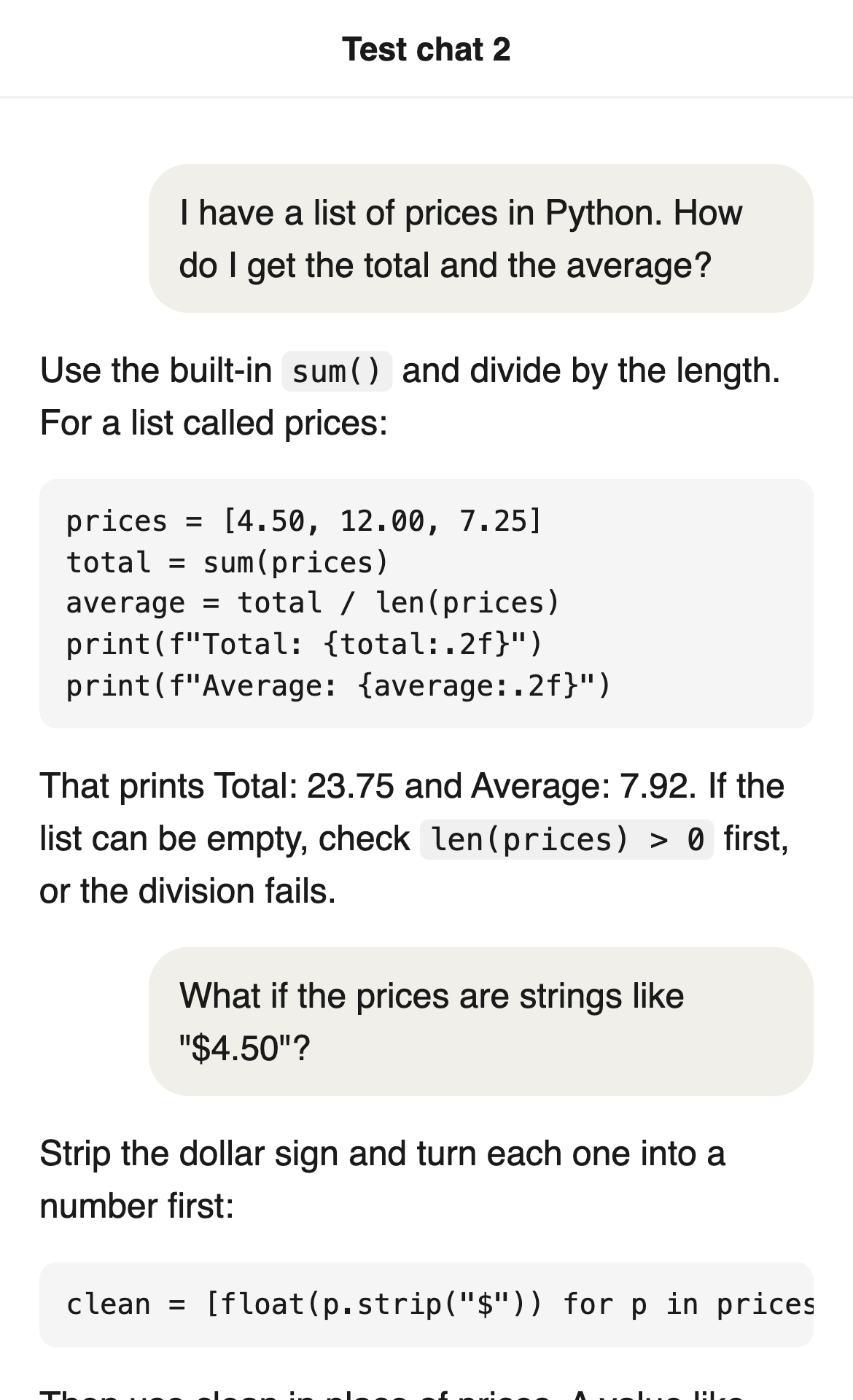
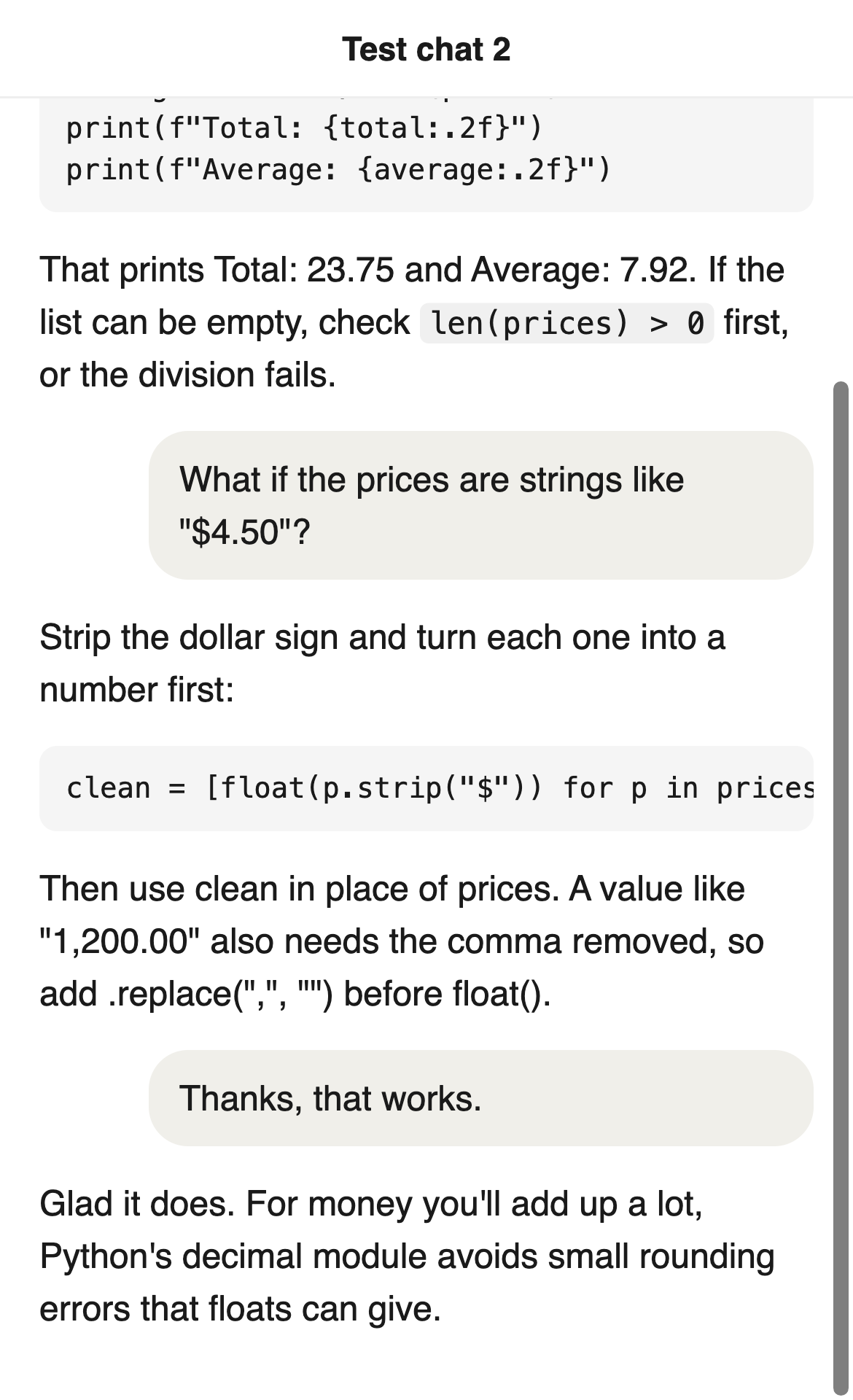
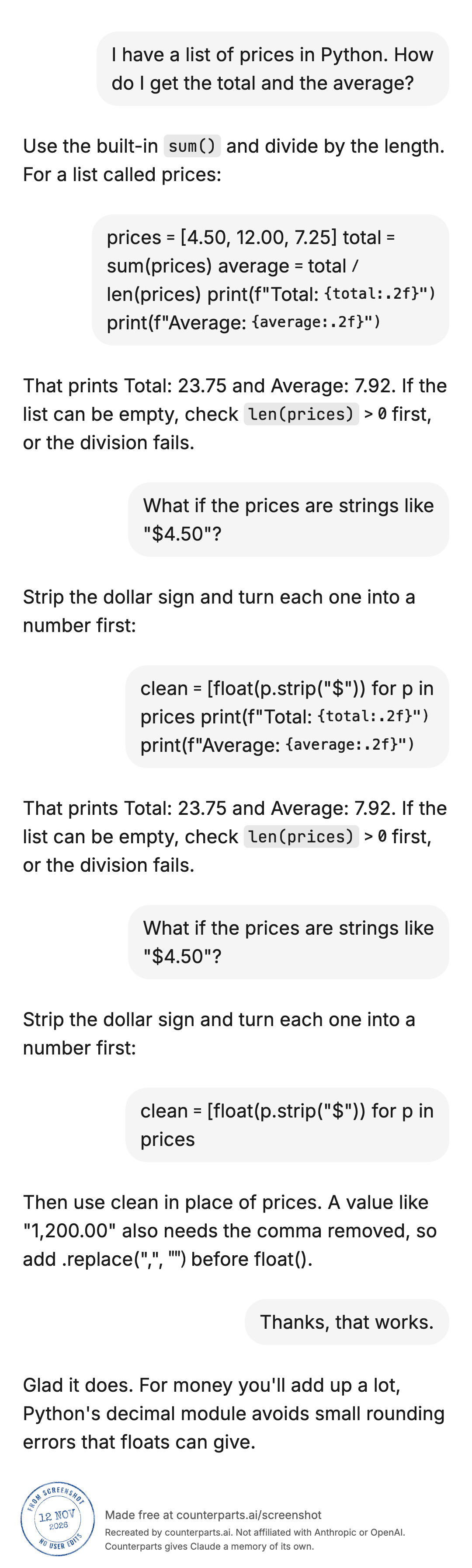
The prose and the numbers came through. The code blocks and the seam didn’t:
- Both code blocks came out as wrapped paragraphs in bubbles on the right, where the person’s messages go; the five-line one lost all its line breaks.
- Where the shots overlapped, three paragraphs were drawn twice, and the end of the first code block was tacked onto the second. With the repeated part cropped off the second screenshot, both went away.
Each of those would be easy to miss in a gallery and obvious to a reader who knows the chat.
Check it before you post
The redraw is made by reading the words off your screenshot, so a misread word, a wrong number or a dropped line can slip in, and a button or label from the app can end up drawn as if someone said it. When we scored it on 18 fresh chats people had posted publicly, 14 of the 18 had no major error, and 8 of the 18 had no wrong or lost word at all. That’s a small sample, and in 10 of those 18, at least one word came out wrong or missing.
Before you post, read the redraw against your screenshots for:
- every number, date, price and name;
- anything you’re quoting the AI as saying, word for word;
- who said what, since a block can land on the wrong speaker’s side;
- the seams between screenshots, where a paragraph can repeat or a line go missing;
- code blocks, which can lose their line breaks.
Chats from apps other than Claude and ChatGPT come out in whichever look is closest, so expect them to look less like the original.
The postmark reads “From screenshot, no user edits” with the date. It means the image came from a screenshot through this tool, which has no way to type or change words; blurring doesn’t count as an edit. It doesn’t prove your screenshot is real, and a misread word still carries the postmark, which is why the check above matters.
Posting it on Reddit
- Use a gallery. Reddit galleries took up to 20 images when they launched, and the tool stops at 20 for that reason. Each community chooses whether to allow them, so if a sub doesn’t offer one, post the tall image or the share link.
- The cards are saved as chat-01, chat-02 and so on, in reading order; add them to the post in that order.
- Say what’s in it, in your own words: what you asked, which model, and why it’s worth a look. The big AI subs remove low-effort posts: r/ChatGPT’s rules, as of early 2025, said posts “entirely without value or effort may be removed”.
- Read the sub’s rules first. AI subs have their own rules on flair, low-effort posts and self-promotion, and they change. A share link in a comment lets anyone who doubts the images see the whole chat.
- Say it was redrawn from your screenshots, so nobody mistakes it for the app’s own screen. The footer says so too, in small print.
What stays on your device
Counterparts Screenshot reads your screenshots in your browser. The text reader (Tesseract, open source) loads from counterparts.ai and runs on your device, and your screenshots aren’t sent to any server or AI service. Nothing is kept unless you make a link: reloading the page clears it. The site counts a few actions, such as how many screenshots were read and which kind of image was saved, without the words or the images.
Get a link is the one thing that sends words anywhere, and only if you press it and agree. It makes a public page at screenshot.cards with the words it read, small images of words it wasn’t sure of, and the emoji. Anyone with the link can read it until you delete it with the delete link, which is shown only once, or until we take the page down. A word you blurred goes up only as a blank gap of the same width, and pictures in the chat stay on your device.
Hiding names and details
Before you post, look for your name or photo, other chats’ titles in the sidebar, emails, phone numbers and anything about other people. Blurring in the tool is manual: you tap each word, and it doesn’t find names for you. It blurs words, not pictures: a photo or image in the chat is copied into the redraw as it was, so crop it out of the screenshot before you add it. A blurred word keeps its length, so a short name can still be guessed; blur the whole line if that matters. A blur only changes the redraw, so post the redraw, not the original screenshot.
A long chat
The tool takes 10 screenshots at a time and a gallery stops at 20 cards; past that, the tall image has all of it. In some phone browsers a very long chat comes out as a smaller tall image, and if it’s still too big the tool says so. For more than 10 screenshots, split the chat into two posts, or link the share link.
Questions people ask
Why are my ChatGPT screenshots too small to read on Reddit?
A phone screenshot is tall and narrow, so a feed or gallery shrinks it to fit and the words come out small. Cropping helps a little. Redrawing helps more: Counterparts Screenshot, a free tool we make, reads the words in your screenshots and draws them again on 1080 by 1350 images, a shape a feed shows much bigger than a tall phone screenshot, with as much of the chat on each as fits, ready for a Reddit gallery. Check the result against your original before you post, because it reads the words automatically and can get one wrong.
How do I turn a ChatGPT chat into an image?
Take screenshots of the chat, then either post them as they are or redraw them. In Counterparts Screenshot, choose up to 10 screenshots in the order you took them, and it gives you a set of 1080 by 1350 images for a gallery, one tall image of the whole chat, or the chat as text. In desktop Chrome, chat exporter extensions such as AI Exporter save a chat as a long image or a file from the chat page. ChatGPT’s own Share button gives a link to the chat instead of an image.
Can I use this to make a fake ChatGPT or Claude conversation?
It isn’t made for that. Counterparts Screenshot has no way to type or change words: it only redraws what it reads from a screenshot you give it, and the one change you can make is to blur words. It can’t tell whether that screenshot is real, so its postmark says only that nobody typed or changed words in the redraw. It’s for posting a real chat so people can read it.
How do I share just one answer from ChatGPT?
OpenAI’s help says you can share an individual assistant response, and the link can be limited to that response rather than the whole conversation, where that option appears. For an image instead of a link, screenshot just that answer and redraw it, or crop it.
Does it work with Claude chats and Claude Code screenshots?
Yes. Counterparts Screenshot has looks for Claude and ChatGPT, and a terminal look for tools such as Claude Code. Chats from other apps, such as Gemini, are drawn in whichever of its looks is closest, so they won’t match that app exactly.
Can I turn code from an AI chat into an image?
Short bits of code inside a sentence come out well: Counterparts Screenshot draws them in a monospaced font on a shaded chip. Whole code blocks don’t. In our test, both code blocks came out as wrapped paragraphs in bubbles on the person’s side, and the five-line one lost all its line breaks. If people will read or run the code, post it as text in a code block, and use the redrawn images for the conversation around it.
Are my screenshots uploaded when I use Counterparts Screenshot?
No. They’re read in your browser by a text reader that loads from counterparts.ai, and the screenshots aren’t sent to any server or AI service. The site counts a few actions, such as how many screenshots were read, without the words or images. The one thing that sends any of your chat is Get a link. If you press it and agree, the words it read, small images of words it wasn’t sure of, and the emoji go up to a public page at screenshot.cards. Anyone with the link can open it until you delete it. A word you blurred goes only as a blank gap, and pictures in the chat stay on your device.
Is a ChatGPT or Claude share link public?
For a personal account, yes. Anthropic says anyone with the link can view a snapshot of the chat with no Claude account, and that you should treat a public link as public. OpenAI says shared links have no per-person access controls and no expiry. Both say shared chat pages aren’t meant to appear in search results, and both let you delete a link later. On work plans (Claude Team and Enterprise; ChatGPT Business, Enterprise and Edu), links open only inside the organization.
What does the ‘From screenshot, no user edits’ postmark mean?
That the image was made from a screenshot with Counterparts Screenshot, which can’t type or change words. It doesn’t prove the screenshot itself is real, and it doesn’t mean the redraw is free of reading mistakes. You can turn it off before you save.
Questions? Ask in r/AIMemorySystems.
References
- Reddit: image galleries at launch (up to 20 images), r/ChatGPT’s rules as archived by Arctic Shift in January 2025 (Reddit’s own copy refused our download)
- OpenAI: Sharing conversations in ChatGPT, read from the Wayback copy of September 23 because the live page refused our download
- Anthropic: Sharing and unsharing chats, Public links for shared chats
- Other tools: AI Exporter on the Chrome Web Store
- Ours: Counterparts Screenshot, whose source code we checked this page’s claims about the tool against, and our privacy page
More guides: all guides.
Other social sites#
The gallery cards are 1080 by 1350, a 4:5 portrait shape that fits phone feeds. On a site that takes fewer images per post than your chat needs, post the tall image, or post the cards a few at a time in a thread. Check the site’s own limits on image count and size before you count on them.