How to hide names and private details in an AI chat screenshot
A screenshot of a chat with ChatGPT or Claude can carry a lot more than the answer you want to show: your name in the AI’s reply, the chat’s title, an email or a street, the name of a file you uploaded, and the clock and battery at the top. Go through it with the checklist below before you share it.
Then hide what you found. Cropping removes it, and a solid shape covers it. Both are safer than a blur. A blur keeps a name out of a quick look. It doesn’t stop someone who wants to know: a blurred word keeps its length, and researchers have recovered pixelated text by guessing and comparing. Nothing on this page makes a chat anonymous, since the rest of the conversation can still point to you.
An AI drafted this page from the sources below and another AI checked it. No person has run these steps. An AI ran Counterparts Screenshot twice, in a desktop browser, on one test image made for this page, and posted nothing. Counterparts Screenshot is ours: Mike LaPeter runs Counterparts.
What in a screenshot gives you away
| Look for | Where it shows | What to do |
|---|---|---|
| Your name, initials or photo | The account button or avatar, a signature, the AI addressing you by name | Crop or cover every one |
| Other people’s names | Your question, the AI’s reply, a draft it wrote for you | Cover; they didn’t agree to be in your post |
| The chat’s title | The header, or the list of chats on a computer | Crop the header; a title often names the person or the problem |
| Your other chats | The sidebar or chat list on a computer, or the menu if it’s open | Crop it away entirely |
| Emails, phone numbers, addresses | Anywhere you pasted a letter or asked for one | Cover, including in a reply the AI wrote for you |
| Your plan or account type | Next to your name in some apps | Crop it with the account button |
| What the app remembers about you | A note that it saved a memory, or a reply that brings up your town, job or family | Cover the note; read the replies for remembered details |
| File names | The chip of an uploaded file | Cover; file names often hold a surname or a company |
| More than you saw | A Full Page or Capture more screenshot, which runs past the edge of the screen | Scroll the whole image before sharing |
| The status bar | Time, carrier, battery and notification icons at the top | Crop it off |
| Notifications | A banner from another app that arrived as you took the shot | Retake the shot or crop it |
On a computer, the sidebar’s list of chat titles can say more about you than the chat you meant to share. On a phone, the chat’s title can sit in the header, as it did in our made-up test below.
Ways to hide it
| Way | What’s left in the image | Good for |
|---|---|---|
| Crop | Nothing you can see; the part is cut off | The status bar, sidebar, header, anything at an edge |
| A solid shape | A box of one color, the size you drew | Names, emails and addresses in the middle of the chat |
| A blur | A smudge as long as the word | Keeping a name out of a quick look, where nobody is trying to read it |
Crop it
On an iPhone, Apple’s guide says to tap the screenshot thumbnail in the lower left and drag the handles to crop. On a Pixel, Google’s help says to tap the preview, or find the screenshot in the Photos app, and tap Edit.
A crop is meant to leave nothing behind. Pixel phones are the warning that it hasn’t always: until Google’s March 2023 security update, Pixel’s Markup editor didn’t shrink the saved file after a crop, so the cropped-off part stayed at the end of the file and could be recovered, and areas scribbled over could show again in the recovered part. The flaw was named aCropalypse and logged as CVE-2023-21036. The same researcher then reported that Windows 11’s Snipping Tool and Windows 10’s Snip & Sketch leaked the same way when you saved a crop over the original file; NVD lists the Snipping Tool one as CVE-2023-28303 (“Windows Snipping Tool Information Disclosure Vulnerability”, published 2023-06-13). The Register’s report says screenshots cropped after the Pixel update should be OK. Keep your phone and computer updated, and remember that shots edited before a fix and already shared stay exposed.
Cover it with a solid shape
On an iPhone, open the screenshot in Markup, tap the Add button, then Add Shape, and pick a square or rectangle. Apple’s guide says you can change a shape’s border color, fill color and opacity from the Markup toolbar. Give it a solid fill and full opacity, then drag it over the word. The pen and marker tools have an opacity slider too; if you scribble over a word instead, set the opacity all the way up and check nothing shows through.
On a Pixel, Google’s help covers the Edit button but not the markup tools themselves. On a computer or an Android phone other than a Pixel, this page can only vouch for cropping, saved as a new file and not over the original. Whatever tool you use, check by zooming in after you save.
Make the box a little wider than the longest word you’re covering, or cover the whole line, because a box the exact size of a short name tells people how short it was.
Blur it in Counterparts Screenshot
Counterparts Screenshot, a free tool we make, reads the words in your screenshots and redraws the chat as clean images, in your browser. You can blur words in the redraw before you save it. How to redraw a chat, step by step, is in How to post an AI chat on Reddit; the blur part is this:
- Open counterparts.ai/screenshot and choose your screenshots. They’re read on your device, not uploaded.
- Under Tap to blur, pick A word or A line.
- Tap each word you want hidden in the preview. It doesn’t find names for you, so tap every place a name appears: the header, your question, the AI’s reply, a signature. Tapping a blurred word again brings it back, and Clear blurs removes them all.
- Save the gallery or the tall image, and share those files, not your original screenshot. The blur is drawn only into the redraw.
It blurs words, not pictures. A photo or image in the chat, such as a profile photo or something you uploaded, is copied into the redraw from your screenshot as it was, and tapping it does nothing, so crop it out of the screenshot before you add it. (This is from the tool’s code; our test had no photo in it.)
The redraw does two things a solid box in your photo app doesn’t: in our test it left out the status bar and the app’s message box on its own, and the clean images are easier to read in a post.
What a blur does and doesn’t protect
It keeps the length. In our test, the blur over “Ana” was about 100 pixels wide and the blur over “Pemberton-Hale,” about 375. Someone who knows your friends can match a short blur to a short name. On a public share page made with Get a link, a blurred word becomes a blank gap sized to the word’s number of letters. Copy text writes every blurred word as the same ▒▒▒.
It can sometimes be guessed back. Blurring and pixelating smear a word without removing it. Depix recovers pixelated text by matching it, block by block, against a sample of the same font pixelated the same way. Bishop Fox’s Unredacter guesses one letter at a time, pixelates each guess, and keeps the one that matches. Both need the font and size, which is easy to know when the text around the blur is visible. A 2016 paper by McPherson, Shokri and Shmatikov showed neural networks recognizing faces and handwritten digits through pixelation and blurring. Bishop Fox’s conclusion: use solid black bars, and nothing else, for text that must stay secret.
Counterparts Screenshot’s blur works the same general way: it takes the word as the redraw shows it, shrinks it to 6 percent of its size and stretches it back. We don’t know of anyone who has tried to reverse it, and we haven’t. Count on it only against a quick look. For a password, a full address, or anything that could hurt someone if read, crop it out of the screenshot before you add it, or don’t share that part.
Your original isn’t changed. A blur in the redraw leaves the full text in the screenshot on your phone. Share the images you saved from the tool, and check which file you’re attaching.
The rest of the chat still talks. In our test chat, with every name blurred, the words “my landlord”, “raising the rent” and the shape of the letter were still there. If the story itself identifies you to people who know you, no blur fixes that.
The postmark doesn’t change. Images saved from Counterparts Screenshot carry a postmark reading “From screenshot, no user edits”, with the day you made it. Blurring doesn’t count as an edit, so a blurred image still carries it; you can turn the postmark off.
The tool’s files carry no hidden extras. The images we saved from it in a desktop browser held only the picture: no date, device or location fields. We didn’t check what a phone’s photo library adds when you save them there, or what a phone writes into its own screenshots.
What happened in our test
The test chat below is made up for this page: every name, email and address in it is fictional (example.com). It’s a plain phone layout, not a copy of ChatGPT or Claude, with a status bar, a chat title naming the person, initials in the corner, an uploaded file’s name, a “saved to memory” note, a draft letter with two emails, and a short name and a long one.
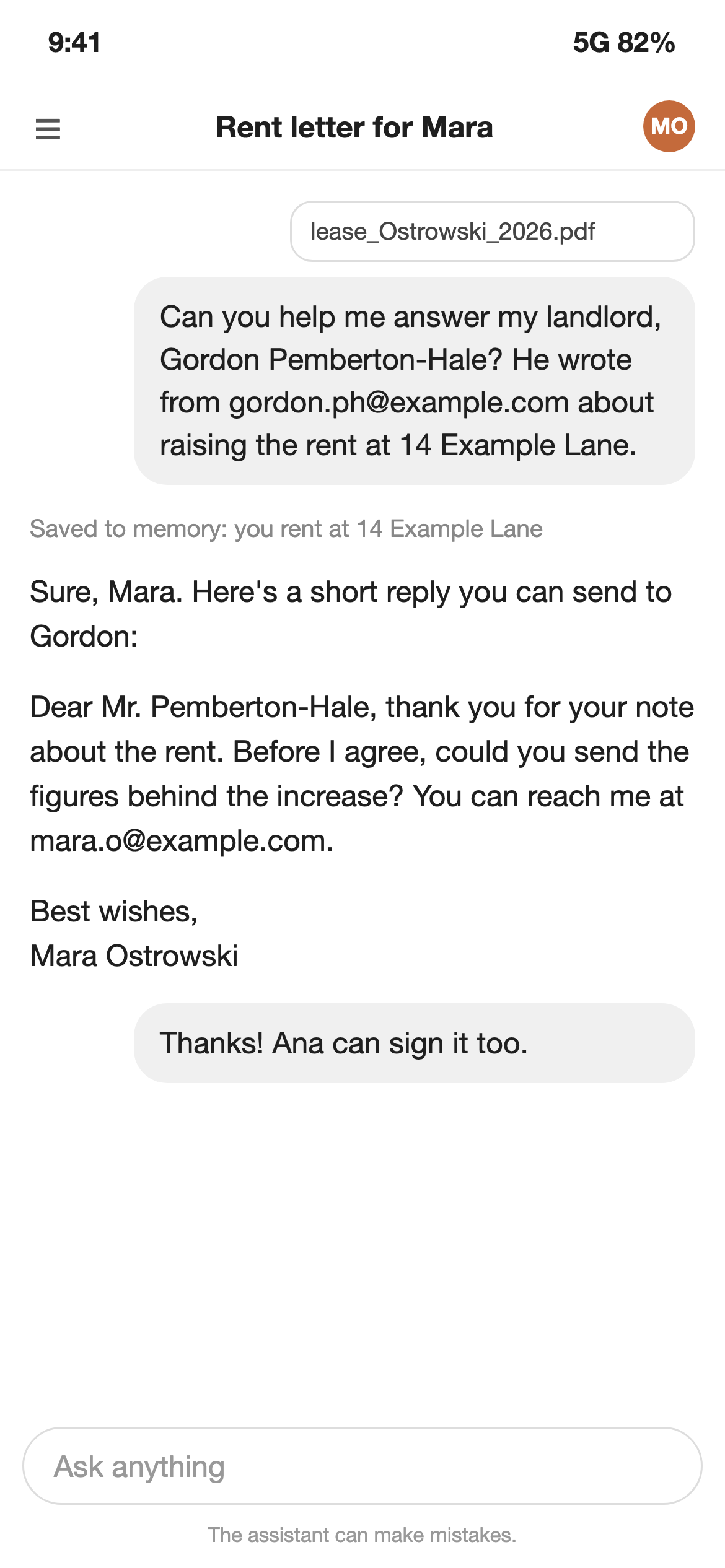
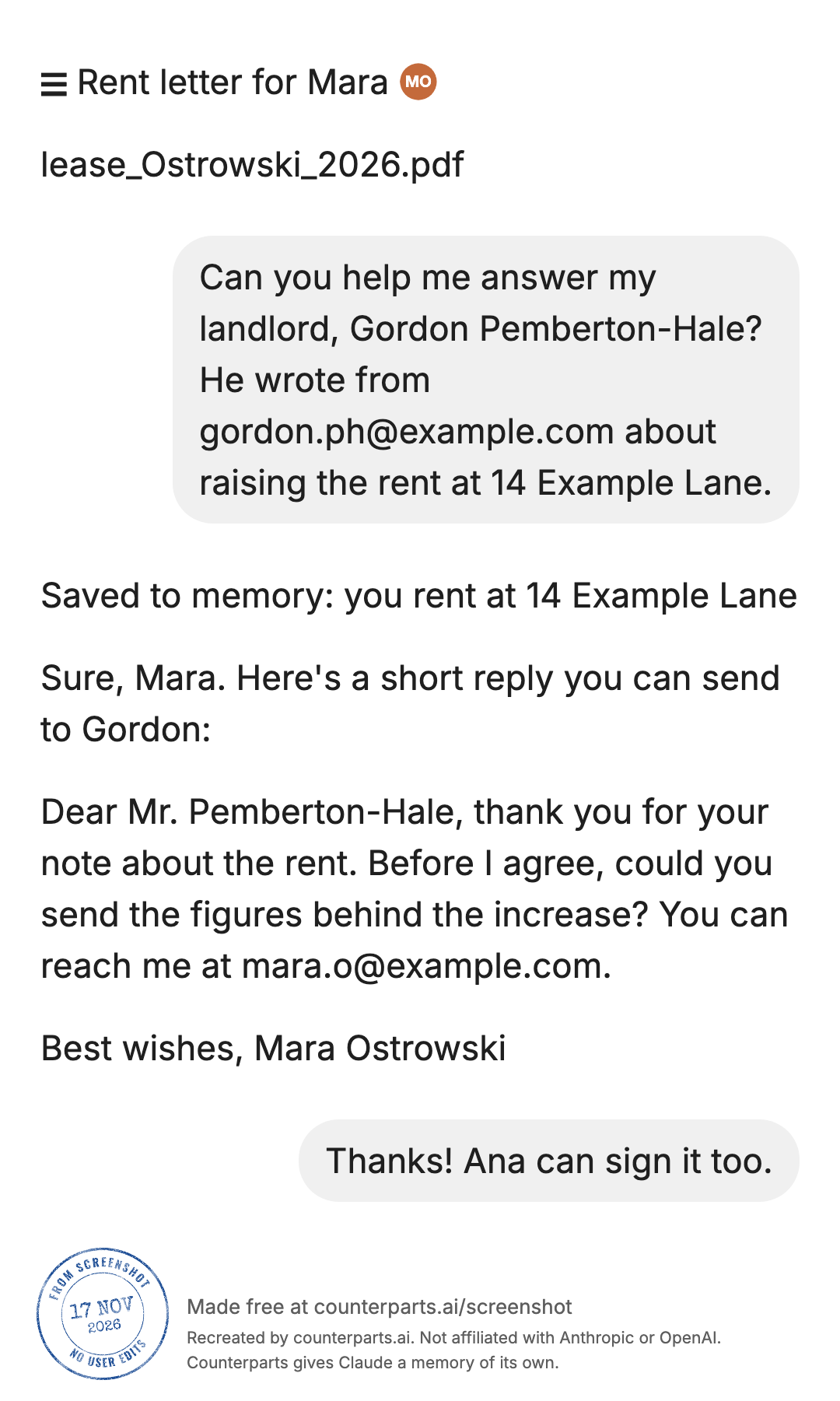
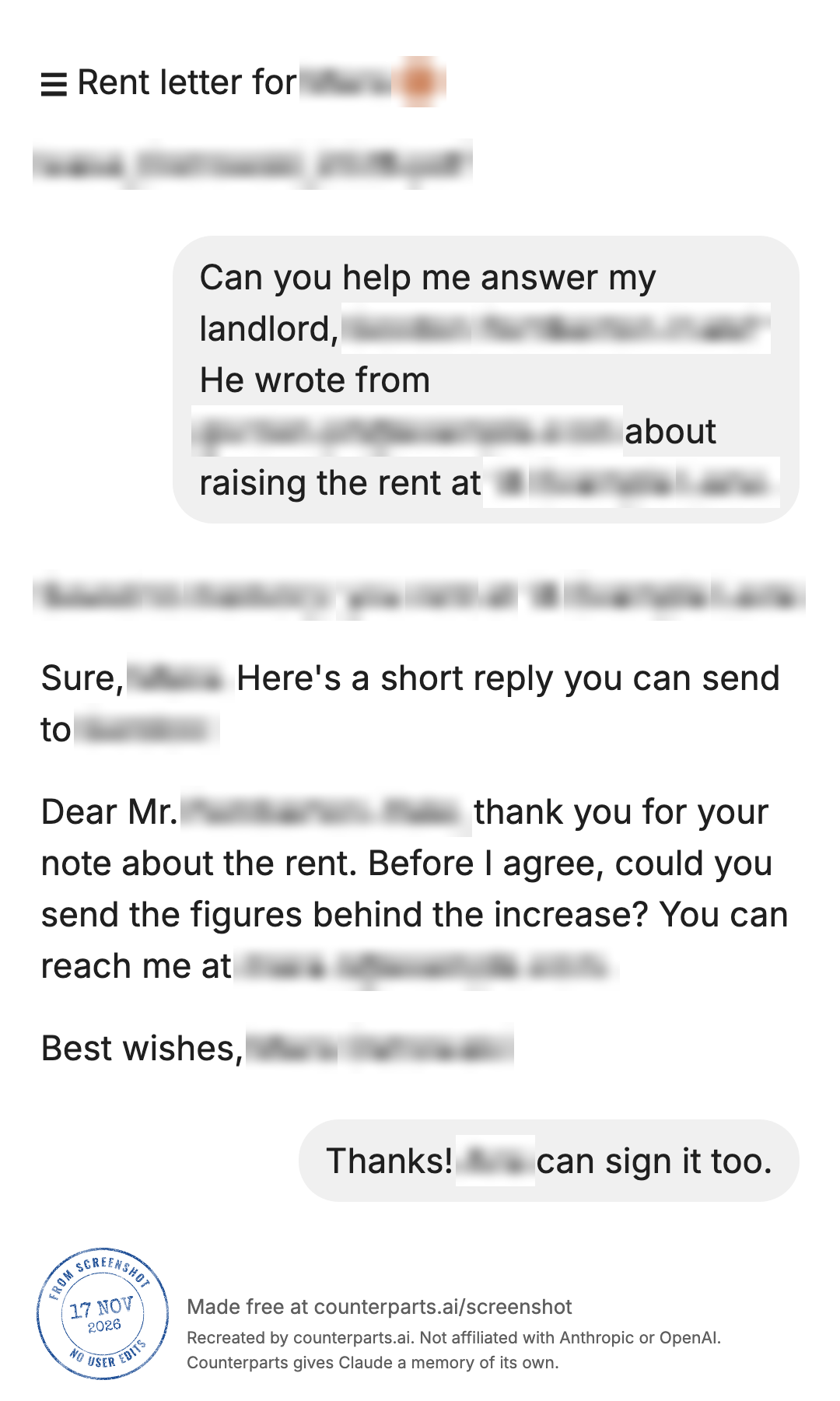
What the redraw did with each thing on the checklist:
| In the screenshot | In the redraw |
|---|---|
| Status bar (9:41, 5G 82%) | Left out |
| Message box and “can make mistakes” line | Left out |
| Chat title “Rent letter for Mara” | Kept, as a line of text; we blurred “Mara” |
| Initials “MO” in a colored circle | Kept as a small image; a tap blurred it, but the orange color still shows. A photo in that spot would be copied as a picture, and pictures can’t be blurred (from the tool’s code, not tested) |
| File name “lease_Ostrowski_2026.pdf” | Kept, as one word; one tap blurred all of it |
| “Saved to memory” note | Kept, as if it were part of the AI’s reply; A line blurred all of it in one tap |
| Names in the question and reply | Kept; “Mara” appeared as a word three times, and each needed its own tap |
| Emails | Kept, each read as one word; one tap each |
It took 17 taps to hide one short chat. Each blur is drawn on the page’s background color, so inside a gray bubble it shows as a white patch. After blurring, a text reader (Tesseract) run on the saved image read none of the blurred words. The gallery cards carried the same blurs as the tall image. That’s one test on a clean, computer-made screenshot; a real phone shot has more to miss, so read the redraw yourself before you save.
Other tools
Browser extensions such as DontLook blur ChatGPT and Gemini conversations and the sidebar while you screen-share or record. That protects a live screen, not a screenshot you’ve already taken. You can also ask an AI to redact an image, but that means uploading the unredacted screenshot first, and you’d still check every spot it missed.
For a long chat as one image, the tall image in Counterparts Screenshot holds the whole conversation; How to screenshot a whole AI chat as one image has the limits.
Questions people ask
How do I hide my name in a screenshot?
Find every place it shows: the account button or initials, the chat’s title, the AI’s own reply (“Sure, Mara”), a signature, a file name. Then crop it off, or cover it with a solid shape in your phone’s markup tools with the opacity all the way up. On an iPhone, Markup’s Add Shape lets you set a shape’s fill color and opacity. Blurring hides a name from a quick look, but a blurred word keeps its length, and published research recovers pixelated text by guessing and comparing, so use a solid shape for anything that must stay hidden.
How do I hide details in a screenshot before I share it?
Crop away what you don’t need first: the status bar, the chat list, everything above and below the part you’re sharing. Then cover what’s left inside the part you keep (names, emails, addresses, file names) with a solid shape, or blur it if a casual look is all you’re guarding against. Share a copy you saved after the edit, and look at it once more before you post.
Is there a ChatGPT screenshot editor?
Counterparts Screenshot, a free tool we make, takes screenshots of a ChatGPT or Claude chat and redraws them as clean images in your browser. The one change it lets you make is to blur words: you tap each one. It can’t type or change words, and it doesn’t find names for you.
Can ChatGPT redact names in an image for me?
You can ask, but that means uploading the unredacted screenshot to it first, and you’d still need to check every spot it missed. Doing it yourself with crop and a solid shape keeps the original on your phone.
Can blurred text be read?
Sometimes. Depix and Bishop Fox’s Unredacter recover pixelated text by comparing it with text in the same font and size, pixelated the same way: Depix matches it block by block against a sample of the font, and Unredacter guesses letter by letter and keeps the guess that matches. A 2016 paper by McPherson, Shokri and Shmatikov showed neural networks recognizing faces and handwritten digits through pixelation and blurring. A short, guessable word, such as a first name, is the easy case. Bishop Fox’s advice is to use solid black bars for anything that must stay secret.
Does Counterparts Screenshot find and blur names automatically?
No. Blurring is manual: you tap each word you want hidden, every time it appears. A name that shows up five times needs five taps. A line mode blurs one whole line of the redraw at a time. It blurs words, not pictures: a photo or image in the chat is copied into the redraw as it was and can’t be blurred, so crop it out of the screenshot before you add it.
Does blurring in Counterparts Screenshot change my original screenshot?
No. The blur is drawn into the redrawn images only. The screenshot in your photos is untouched and still shows everything, so share the images you saved from the tool, not the original.
Can someone un-crop a cropped screenshot?
It has happened. Until Google’s March 2023 security update, Pixel’s Markup editor could leave the cropped-out part of the image in the saved file, where it could be recovered (aCropalypse, CVE-2023-21036). Windows 11’s Snipping Tool and Windows 10’s Snip & Sketch were reported to leak the same way when you saved over the original; the Snipping Tool one was logged as CVE-2023-28303. Screenshots cropped that way and already shared stay exposed. The Register’s report says screenshots cropped after the Pixel update should be OK. Keep your phone and computer updated.
Do my blurred words go up when I press Get a link?
Not as text. Counterparts says a word you blurred goes to the public share page only as a blank gap of the same width. The gap still shows how long the word was. We didn’t press Get a link for this page, because it publishes a page.
Do screenshot blur extensions do the same thing?
They do a different job. Browser extensions such as DontLook blur the chat page and sidebar live while you screen-share or record. They don’t edit a screenshot you’ve already taken.
Questions? Ask in r/AIMemorySystems.
References
- Apple: Take a screenshot on iPhone, Draw and handwrite with Markup, Add text, shapes, stickers, and more with Markup
- Google: Take a screenshot on your Pixel phone or tablet, Pixel Update Bulletin, March 2023, CVE-2023-21036 at NVD
- Microsoft: CVE-2023-28303 at NVD
- Reporting on aCropalypse: The Register, March 2023
- Recovering pixelated and blurred content: Depix, Bishop Fox’s Unredacter write-up and source, McPherson, Shokri and Shmatikov, Defeating Image Obfuscation with Deep Learning (2016)
- Other tools: DontLook on the Chrome Web Store
- Ours: Counterparts Screenshot, whose source code we checked this page’s claims about the tool against, and our privacy page
More guides: all guides.